The product
One app for the whole job —
from first quote to year‑end books.
Quoting, a client history that writes itself, scheduling, job costing, payments, bookkeeping and an AI assistant — built to be run from your phone, not shrunk onto it.
- No credit card
- Built in Canada
The bird’s-eye dashboard
The whole business, on one screen.
Revenue in motion, active jobs, collection risk, the crew dispatched today and the work that needs attention — counted from your own records, no spreadsheet required.

Quotes that close
A quote they can approve before you leave the driveway.
Built in sections like you’d explain it, branded your colour, with optional upsells the client toggles themselves. Your costs and margin stay private.
- 54 templates across nine trades, priced from your own services
- Client approval on their phone, signed with a typed name
- Read receipts — see when they first open it

A client history that writes itself
Every client writes their own history.
Quotes, opens, approvals, deposits you record, invoices paid in full and posted receipts file themselves onto each client’s timeline. A win-back list surfaces the revenue you forgot to chase.
- Automatic timelines as the work happens
- Pre-written follow-up texts, sent from your phone
- 60-day win-back radar

Scheduling & dispatch
Book the crew from the office — and take client requests.
A schedule board and week grid put every job and every tech in one view. Clients ask for a slot from a link and you confirm; the crew sees the day from their phone.
- Schedule board, week grid and team load in one place
- Client booking links with real availability; you confirm
- A queue for work that still needs a date

Jobs & project management
Every job knows its own cost, margin and progress.
When a client approves a quote, its job is marked approved, with a budget you can watch. Materials, labour and receipts you enter post to it — so the margin you quoted is the margin you watch.
- Approved quotes become approved jobs, automatically
- Checklists, photos and documents on every job
- Progress-draw terms written on larger-project quotes

Payments & deposits
Ask for the deposit before you pull away.
Ask for a deposit on the quote, record it when it arrives, and it is credited against the final invoice. Draft the invoice from the job, send it, and record each payment as it lands.
- Deposits requested on the quote, credited on the invoice
- Invoices drafted from the job, with a log of the reminders you send
- Every payment posts straight to the books

Books kept as you work
Snap a receipt. Confirm it. It’s in the books.
On Pro, AI reads the vendor, amounts and GST, then Upkote suggests the job — and you can split one bill across jobs. Sorted into CRA categories and accountant‑ready once you confirm.
- Suggests the right job for you to confirm
- GST/HST input credits tracked
- A year-end package for your accountant

Money & live P&L
A profit-and-loss that’s always current — not a year-end surprise.
Because every quote, payment, cost and receipt lands in one place, your P&L, cash forecast and GST/HST position are live. Invite your accountant to a read-only seat.
- Live P&L, and a 13-week forecast from open invoices and bills
- GST/HST owing by quarter, always current
- A read-only accountant seat and year-end package

Upkote AI
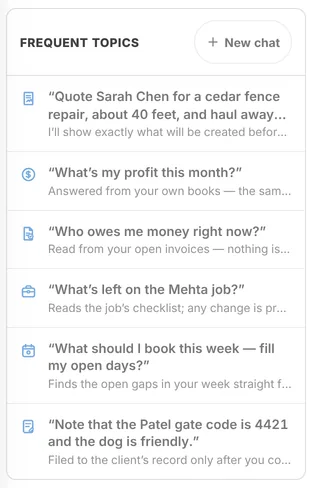
Describe the job in a sentence. Get a draft quote.
Tell the assistant who and what — it finds the client, prices what is in your services, totals it with the right tax, and hands you a draft to approve. Nothing is created or sent without your confirmation.
- Type it in — a draft quote from one sentence
- Polish your wording · ask about your numbers
- AI credits every month, on every plan
Every plan includes 10 AI credits a month. Nothing is created or sent without your confirmation.